



If you run Google Ads, conversion tracking is the part that tells you which clicks turned into enquiries, calls or sales. This guide is for UK business owners and in-house marketers who want to set up Google Ads conversion tracking properly, or check that what they already have is right. By the end you will know which actions to track, how to set them up step by step, how to test them, and how to avoid the mistakes that quietly waste budget.
What is Google Ads conversion tracking?
Google Ads conversion tracking records when someone clicks your ad and then does something valuable on your website, such as buying, filling in a form or calling you. Google matches that action back to the ad, keyword and campaign that brought them.
A conversion is any action you decide is worth counting. A conversion action is the setting in Google Ads that defines one of them, with its name, value and counting rules. The Google tag is the small piece of code that sends the information from your website to Google.
Without it, Google Ads can only report clicks and cost. You can see what you spent, but not what you got back.
Why does conversion tracking matter so much?
It matters because Google's bidding uses your conversion data to decide who to show your ads to and how much to bid. If the data is missing or wrong, the bidding learns the wrong lessons.
There are three practical reasons to get it right:
- You can see what works. You know which keywords and campaigns bring enquiries or sales, so you can move budget towards them.
- Smart bidding needs it. Strategies such as Maximise conversions, Target CPA and Target ROAS only work well with accurate conversion data.
- You can work out return. With values attached, you can compare what you spend with what comes back, using a figure such as ROAS (return on ad spend).
If you are not sure what return you need before ads pay for themselves, the free breakeven ROAS calculator works it out from your margins.
Which conversions should you track?
Track the actions that are closest to money, and keep everything else as secondary. Most businesses need between one and four primary conversions.
For lead generation businesses
- Enquiry form submissions (counted on the thank-you page or a successful submit event)
- Phone calls from the ads and from your website
- Bookings made through a calendar or booking tool
- Qualified leads imported from your CRM, if you have one
For online shops
- Purchases, with the order value and a transaction ID
- Add to basket and begin checkout, as secondary actions only
Primary conversions are used for bidding and appear in the main Conversions column. Secondary conversions are recorded for reporting but do not steer the bidding. Keeping small actions secondary stops Google chasing cheap clicks that never become customers.
How to set up Google Ads conversion tracking, step by step
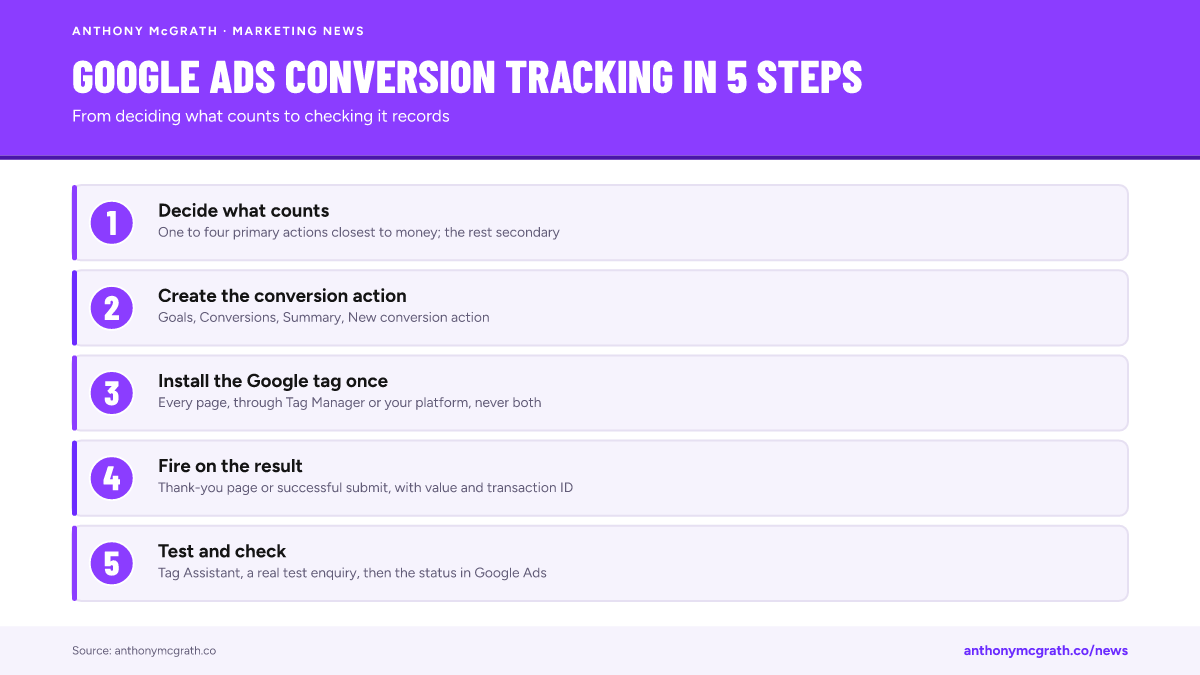
Here is the process for a website, using the Google tag. If you already use Google Tag Manager, the steps are the same in Google Ads, and the tag goes into Tag Manager instead of straight onto the site.
- Decide what counts. Write down each action, whether it is primary or secondary, and what it is worth.
- Create the conversion action. In Google Ads go to Goals, then Conversions, then Summary, and press New conversion action. Choose Website and enter your domain.
- Choose the category and name. Pick the category that fits, such as Purchase, Submit lead form or Book appointment, and give it a clear name such as "Enquiry form, thank-you page".
- Set the value. Use the actual order value for a shop. For leads, use a fixed value based on what a lead is worth to you on average.
- Set the counting. Choose Every for purchases, so repeat orders are counted. Choose One for leads, so the same person filling in a form twice counts once.
- Set the windows. The click-through window is how long after a click a conversion can still be credited. The defaults suit most businesses; shorten them only if your customers decide quickly.
- Install the Google tag. Add the tag to every page of your site, through Google Tag Manager, your website platform's built-in setting, or the code itself.
- Add the event. Fire the conversion event on the thank-you page or on a successful submission, never on the button click alone. For purchases, pass the value, currency and transaction ID.
- Turn on enhanced conversions. This sends a protected (hashed) version of the email address the customer entered, which helps Google match conversions it would otherwise miss.
- Test it. Use Tag Assistant and a real test submission, then check the conversion action status in Google Ads over the next day or two.
How do you test conversion tracking?
Test it by doing the action yourself while watching what fires, then confirming that Google Ads records it.
- Open Tag Assistant, connect your site and complete a test enquiry or purchase.
- Check the conversion event fires once, on the right page, with the right value.
- In Google Ads, the conversion action status should change from "Unverified" to "Recording conversions" or "No recent conversions" within a day or so.
- For a shop, compare a few days of orders in Google Ads with your shop's own orders. They will not match exactly, but they should be close.
If the status stays "Unverified" or "Inactive"
"Unverified" means Google has not seen the tag on your site yet, so check the tag is on every page and that your cookie banner is not blocking it before consent is given. "Inactive" means no conversions in the last seven days: either nothing happened, or the event stopped firing after a website change. A quick test submission tells you which.
If numbers in Google Ads and Google Analytics disagree, that is usually expected. This guide on why GA4 and Google Ads numbers never match explains which gaps are normal and which mean a fault.
How do you track phone calls from Google Ads?
You track calls in two places: calls made straight from the ad, and calls made after someone visits your website. Each needs its own conversion action.
Calls from the ad
Add a call asset to your campaigns, then create a conversion action for Calls from ads. Set a minimum call length, such as 60 seconds, so short or wrong-number calls are not counted.
Calls from your website
For people who click the ad, land on your site and then ring you, create a conversion action for Calls to a phone number on your website. Google swaps the number on your site for a Google forwarding number for visitors who came from an ad, so it can tell which click led to the call.
Clicks on your phone number
On mobiles, many people tap the number instead of dialling it. You can count a tap on your phone link as a secondary conversion. Keep it secondary, because a tap does not always become a call.
If phone calls are where most of your work comes from, call tracking is usually the biggest gap in an account. It is worth fixing before anything else.
Do you need Google Tag Manager?
You do not need it, but it makes tracking easier to manage as you add more platforms. Google Tag Manager is a free tool that holds all your tracking tags in one place, so you can add or change them without editing the website each time.
Use the Google tag on its own when:
- you only advertise on Google, and
- your website platform has a built-in setting for the Google tag and conversion events.
Use Google Tag Manager when:
- you also run Meta, Microsoft, LinkedIn or TikTok ads,
- you need custom events, such as a booking tool or a form inside a pop-up, or
- you plan to add server-side tracking later.
Whichever you use, put the tag on the site once. Installing the Google tag directly and again through Tag Manager is a common cause of doubled conversions.
Consent Mode, cookies and UK GDPR
In the UK you need consent before setting advertising cookies, so your cookie banner and your tags have to work together. Google's Consent Mode passes each visitor's choice to Google's tags, and the tags then behave accordingly.
With Consent Mode v2, Google receives two extra signals about advertising consent. When someone declines, Google can still model some conversions from anonymous signals. You should still respect the choice, and your banner should load before any advertising tag sets a cookie.
What this means in practice:
- Use a cookie banner that supports Consent Mode, or set it up in Tag Manager.
- Check, in Tag Assistant, that tags wait for consent before setting cookies.
- Expect fewer observed conversions when many visitors decline. That is normal, not a broken tag.
Google's own consent mode guide covers the technical set-up in detail.
A worked UK example
Here is an example for an imaginary Leeds plumbing firm. The numbers are illustrative only.
The firm gets enquiries from a website form and phone calls. On average, one in four enquiries becomes a job, and an average job brings £400 of profit. So one enquiry is worth about £100 (£400 divided by four).
They set up:
- Enquiry form, primary, value £100, counted once per person
- Calls from ads, primary, value £100, calls of 60 seconds or more
- Calls from the website, primary, value £100, using Google forwarding numbers
- Clicks on the email address, secondary, no value
In one month the example account spends £1,500 and records 30 primary conversions worth £3,000 in total. That is a cost per enquiry of £50 and a return of two pounds for every pound spent, which the firm can now compare against what it needs to break even.
Common mistakes
Most tracking problems come from a handful of mistakes. Check for these first.
- Counting the button click, not the result. A click on "Send" counts even when the form fails. Fire the event only when the submission succeeds.
- Counting the same conversion twice. Importing a GA4 conversion and also using the Google Ads tag for the same action doubles it. Only one should be primary.
- No transaction ID on purchases. Without it, a refreshed thank-you page can count a second sale.
- Everything set as primary. Page views and basket adds as primary conversions push bidding towards cheap, low-value actions.
- Values that mean nothing. A value of 1 on every lead tells Google nothing about which leads matter. Use a realistic average.
- Never checking again. Website changes, new cookie banners and platform updates break tags. Check your conversions after every site change and at least once a month.
Should you use server-side tracking?
Server-side tracking is worth considering when you spend a meaningful amount on ads, sell online, or see a growing gap between real sales and what the platforms report. It sends conversion data from a server you control instead of relying only on the visitor's browser, which helps when browsers and ad blockers limit tracking.
It is not a fix for a broken set-up. Get the basic tags and conversion actions right first, then consider server-side tracking as the next step.
What to do next
Start with a list of the actions that bring you money, check each one against the steps above, and test them with a real enquiry or order. If anything does not fire, fires twice or reports the wrong value, fix that before changing bids or budgets.
If you would rather have it checked for you, I can audit your tracking and give you a plain-English fix list. See tracking set-up and audits, or get in touch.